Getting Started Guide
The goal of this guide is to show the most basic use case of our API: getting the HTML of a website. To do this, we will use the POST /sync/scrape endpoint as follows:
- cURL
- Python
curl -X 'POST' \
  'https://api.scrapingpros.com/v1/sync/scrape' \
  -H 'accept: application/json' \
  -H 'Authorization: Bearer API-KEY' \
  -H 'Content-Type: application/json' \
  -d '{
  "url": "https://example.com"
}'
from sp_client import *

client = ScrapingPros("API-KEY")
data = RequestData()
data.set_url("https://example.com")

client.scrape_site(data)
The Python library is still under development.
For the moment, there is a single API key for all users. You need to contact the team to obtain it.
This way, we are telling the API that we want to get the HTML of https://example.com. After a few seconds, we should receive a response like the following:
{
  "html": "<!doctype html><html lang=\"en\"><head><title>Example Domain</title><meta name=\"viewport\" content=\"width=device-width, initial-scale=1\"><style>body{background:#eee;width:60vw;margin:15vh auto;font-family:system-ui,sans-serif}h1{font-size:1.5em}div{opacity:0.8}a:link,a:visited{color:#348}</style></head><body><div><h1>Example Domain</h1><p>This domain is for use in documentation examples without needing permission. Avoid use in operations.</p><p><a href=\"https://iana.org/domains/example\">Learn more</a></p></div></body></html>\n",
  "statusCode": 200,
  "message": "OK",
  "screenshot": null,
  "executionTime": 0.19,
  "extracted_data": null
}
Let's review the fields:
- html: The site content in HTML format. This can be parsed and traversed using libraries like BeautifulSoup or LXML.
- statusCode: This code is the site's response (not the API's) to our request. A 200 code means the request was successful.
- message: Message sent by the site as a response to our request. In cases where the code is not 200, it may provide more details about why the request was not successful.
- screenshot and extracted_data: We will cover these later.
- executionTime: Time taken to execute the request.
Interacting with the site
If we visit the page we scraped, we will notice it has a link. To click it after accessing the page, we need to make some changes to our initial request:
- First, we need to indicate that we want to use a browser, since we cannot interact with a site otherwise.
- We also need to specify the actions we want to perform on the site. In our case, clicking the link, and then waiting a few seconds.
With these changes, our request looks like this:
- cURL
- Python
curl -X 'POST' \
  'https://api.scrapingpros.com/v1/sync/scrape' \
  -H 'accept: application/json' \
  -H 'Authorization: Bearer API-KEY' \
  -H 'Content-Type: application/json' \
  -d '{
  "url": "https://example.com",
  "browser": true,
  "actions": [
    {
      "type": "click",
      "selector": "//a"
    },
    {
      "type": "wait-for-timeout",
      "time": 3000
    }
  ]
}'
The Python library is still under development.
After several seconds, we will get a result similar to the previous one, but with the new page.
{
"html": "<!DOCTYPE html><html><head>\n\t<title>Example Domains</title>\n\n\t<meta charset=\"utf-8\">\n\t<meta http-equiv=\"Content-type\" content=\"text/html; charset=utf-8\">\n\t<meta name=\"viewport\" content=\"width=device-width, initial-scale=1\">\n\t\n <link rel=\"stylesheet\" href=\"/static/_css/2025.01/iana_website.css\">\n <link rel=\"shortcut icon\" type=\"image/ico\" href=\"/static/_img/bookmark_icon.ico\">\n <script type=\"text/javascript\" src=\"/static/_js/jquery.js\"></script>\n <script type=\"text/javascript\" src=\"/static/_js/iana.js\"></script>\n\n\t\n</head>\n\n<body>\n\n\n\n<header>\n <div id=\"header\">\n <div id=\"logo\">\n <a href=\"/\"><img src=\"/static/_img/2025.01/iana-logo-header.svg\" alt=\"Homepage\"></a>\n </div>\n <div class=\"navigation\">\n <ul>\n <li><a href=\"/domains\">Domains</a></li>\n <li><a href=\"/protocols\">Protocols</a></li>\n <li><a href=\"/numbers\">Numbers</a></li>\n <li><a href=\"/about\">About</a></li>\n </ul>\n </div>\n </div>\n \n \n</header>\n\n<div id=\"body\">\n\n\n<article class=\"hemmed sidenav\">\n\n <main>\n \n<div class=\"help-article\">\n\n<h1>Example Domains</h1>\n<p>As described in <a href=\"/go/rfc2606\">RFC 2606</a> and <a href=\"/go/rfc6761\">RFC 6761</a>, a\nnumber of domains such as example.com and example.org are maintained\nfor documentation purposes. These domains may be used as illustrative\nexamples in documents without prior coordination with us. They are not\navailable for registration or transfer.</p>\n<p>We provide a web service on the example domain hosts to provide basic\ninformation on the purpose of the domain. These web services are\nprovided as best effort, but are not designed to support production\napplications. While incidental traffic for incorrectly configured\napplications is expected, please do not design applications that require\nthe example domains to have operating HTTP service.</p>\n<h2>Further Reading</h2>\n<ul>\n<li><a href=\"/domains/reserved\">IANA-managed Reserved Domains</a></li>\n</ul>\n\n<div class=\"last-updated\">Last revised 2017-05-13.</div>\n\n\n</div>\n\n </main>\n\n <nav id=\"sidenav\">\n \n </nav>\n\n</article>\n\n\n</div>\n\n<footer>\n <div id=\"footer\">\n <table class=\"navigation\">\n <tbody><tr>\n <td class=\"section\"><a href=\"/domains\">Domain Names</a></td>\n <td class=\"subsection\">\n <ul>\n <li><a href=\"/domains/root\">Root Zone Registry</a></li>\n <li><a href=\"/domains/int\">.INT Registry</a></li>\n <li><a href=\"/domains/arpa\">.ARPA Registry</a></li>\n <li><a href=\"/domains/idn-tables\">IDN Repository</a></li>\n </ul>\n </td>\n </tr>\n <tr>\n <td class=\"section\"><a href=\"/numbers\">Number Resources</a></td>\n <td class=\"subsection\">\n <ul>\n <li><a href=\"/abuse\">Abuse Information</a></li>\n </ul>\n </td>\n </tr>\n <tr>\n <td class=\"section\"><a href=\"/protocols\">Protocols</a></td>\n <td class=\"subsection\">\n <ul>\n <li><a href=\"/protocols\">Protocol Registries</a></li>\n <li><a href=\"/time-zones\">Time Zone Database</a></li>\n </ul>\n </td>\n </tr>\n <tr>\n <td class=\"section\"><a href=\"/about\">About Us</a></td>\n <td class=\"subsection\">\n <ul>\n <li><a href=\"/news\">News</a></li>\n <li><a href=\"/performance\">Performance</a></li>\n <li><a href=\"/about/excellence\">Excellence</a></li>\n <li><a href=\"/archive\">Archive</a></li>\n <li><a href=\"/contact\">Contact Us</a></li>\n </ul>\n </td>\n </tr>\n </tbody></table>\n <div id=\"custodian\">\n <p>The IANA functions coordinate the Internet's globally unique identifiers, and\n are provided by <a href=\"https://pti.icann.org\">Public Technical Identifiers</a>, an affiliate of\n <a href=\"https://www.icann.org/\">ICANN</a>.</p>\n </div>\n <div id=\"legalnotice\">\n <ul>\n <li><a href=\"https://www.icann.org/privacy/policy\">Privacy Policy</a></li>\n <li><a href=\"https://www.icann.org/privacy/tos\">Terms of Service</a></li>\n \n </ul>\n </div>\n </div>\n</footer>\n\n\n\n\n\n\n\n</body></html>",
"statusCode": 200,
"message": "",
"screenshot": null,
"executionTime": 18.074,
"extracted_data": null
}
The result has the same format as when a browser is not used, but with a noticeable increase in execution time. Using a browser is more expensive than making a simple request, so it is recommended to use it only when there is a clear reason to do so.
Browser
When making a request without indicating that a browser is needed, the API simply makes an HTTP GET request to the specified page to get its HTML. With simple pages, this is usually sufficient. However, there are many cases where a browser is necessary:
- When the site executes JavaScript to load some of its parts.
- If we want to perform actions on the site, such as clicking something or typing in a search box.
- To bypass blocks or bot detection mechanisms.
Actions
Actions are tools we have to interact with the site through the API. They allow us, for example, to click elements (as in this example we are working on), select options from a dropdown menu, type in inputs, among several others.
You can access the exhaustive list of actions at !(PENDING LINK)[].
Each action has specific options. The click action we used in this example has a selector option that allows us to indicate which element we want to click using XPATHs or CSS Selectors.
"//a" # XPATH

"css:a" # CSS Selector. Note that it starts with "css" to indicate it is not an XPATH.
If that selector matches a list, the action is performed on the first element of the list.
Then, we use the wait-for-timeout action with a time of 3000ms, specified in the time option, to give the browser time to finish loading the link we are accessing.
Screenshots
Another feature that using a browser offers is the ability to take a screenshot of the site we are accessing.
- cURL
- Python
curl -X 'POST' \
  'https://api.scrapingpros.com/v1/sync/scrape' \
  -H 'accept: application/json' \
  -H 'Authorization: Bearer API-KEY' \
  -H 'Content-Type: application/json' \
  -d '{
  "url": "example.com",
  "browser": true,
  "screenshot": true
}'
The Python library is still under development.
This would give us a response like the following:
{
  "html": "<!DOCTYPE html><html lang=\"en\"><head><title>Example Domain</title><meta name=\"viewport\" content=\"width=device-width, initial-scale=1\"><style>body{background:#eee;width:60vw;margin:15vh auto;font-family:system-ui,sans-serif}h1{font-size:1.5em}div{opacity:0.8}a:link,a:visited{color:#348}</style></head><body><div><h1>Example Domain</h1><p>This domain is for use in documentation examples without needing permission. Avoid use in operations.</p><p><a href=\"https://iana.org/domains/example\">Learn more</a></p></div>\n</body></html>",
  "statusCode": 200,
  "message": "",
  "screenshot": "iVBORw0KGgoAAAANSUhEUgAACgAAAASwCAYAAAA/XnOsAAAABGdBTUEAALGPC...",
  "executionTime": 17.039,
  "extracted_data": null
}
The value of the screenshot field is the screen capture encoded in base64. Once decoded, it can be saved as a PNG image.
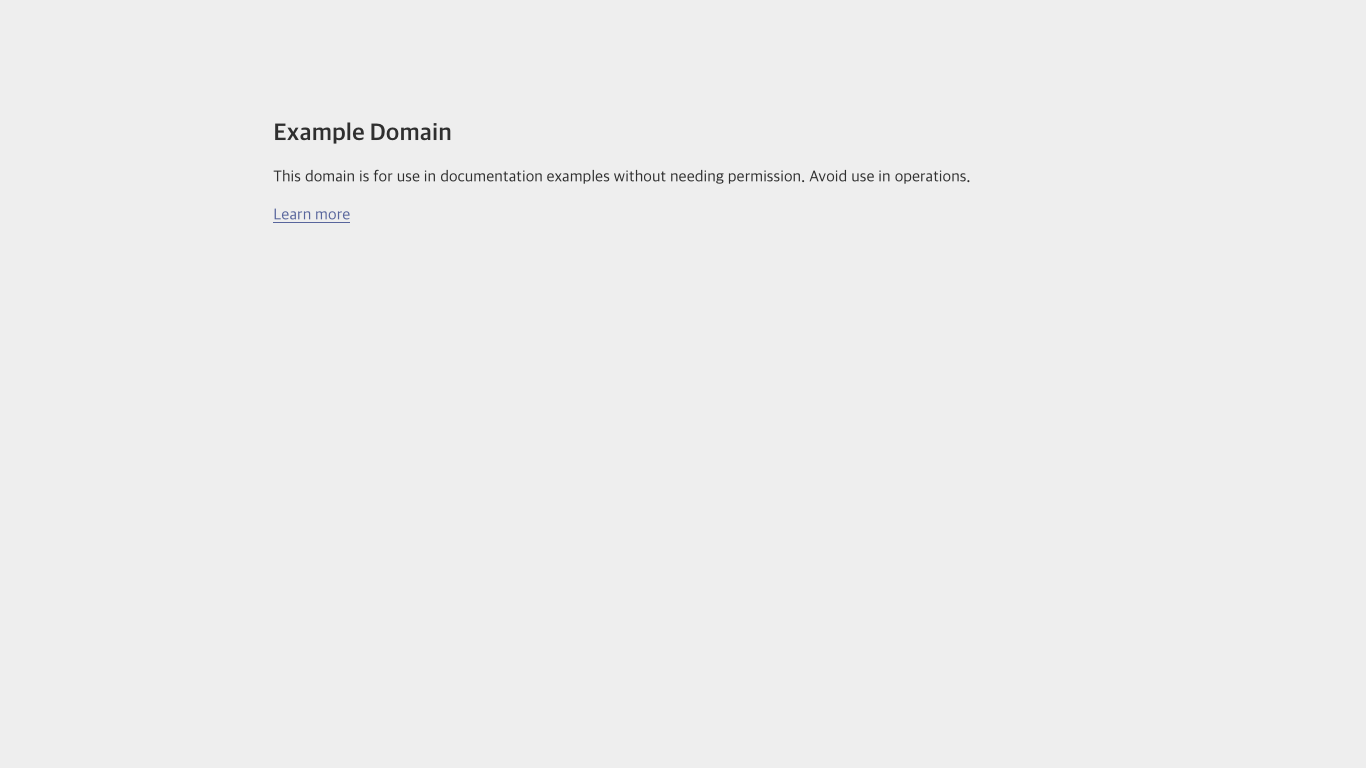
There is an identified issue with screenshots (especially when no actions are performed on the site), where they may contain erroneous characters.
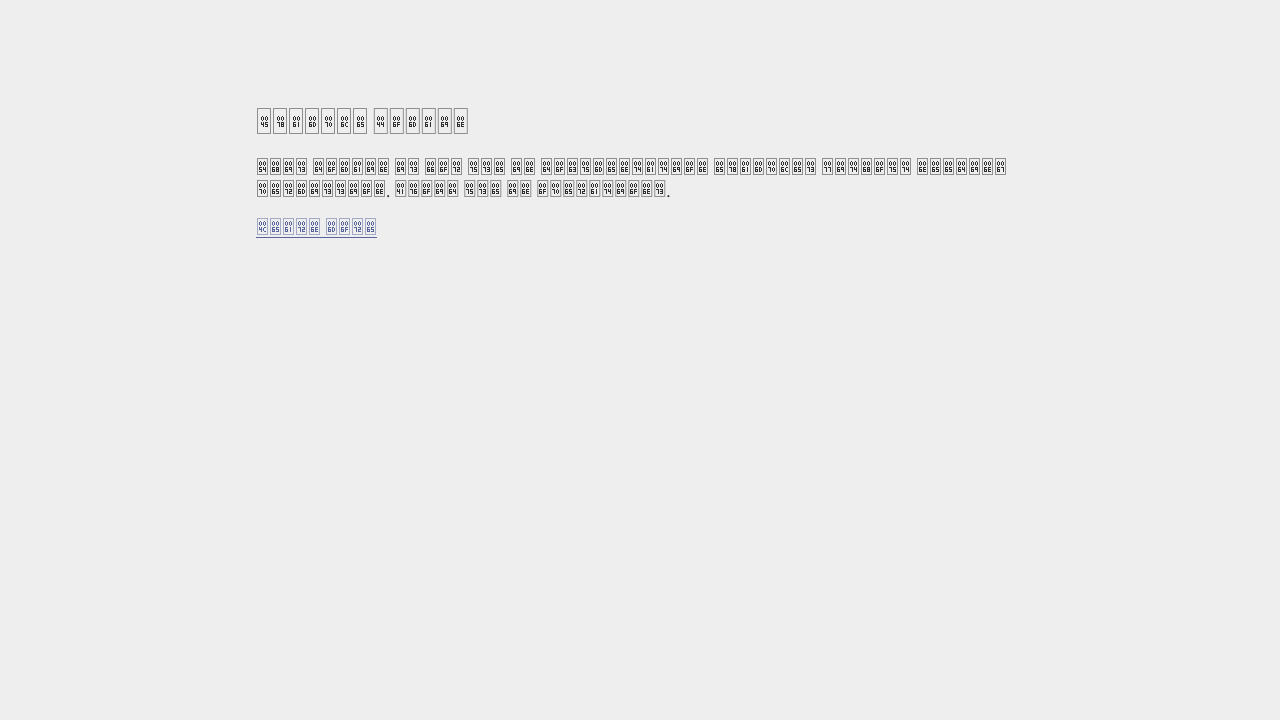
In these cases, the solution is usually to use a "wait-for-timeout" action, to allow the fonts to finish loading.
Extracting information
The last feature we will cover in this guide is the option to extract information from the page, so you don't have to parse and extract information from the HTML using external libraries.
This works with and without browser.
- cURL
- Python
curl -X 'POST' \
  'https://api.scrapingpros.com/v1/sync/scrape' \
  -H 'accept: application/json' \
  -H 'Authorization: Bearer API-KEY' \
  -H 'Content-Type: application/json' \
  -d '{
  "url": "https://example.com",
  "extract": {
    "title": "css:h1",
    "all_divs": {
      "multiple": true,
      "selector": "//div/*"
    },
    "link": {
      "attribute": "href",
      "selector": "css:a"
    }
  }
}'
The Python library is still under development.
In this example, we see 3 different ways to use the information extraction feature.
# 1. Simply specifying what you want to scrape, and the corresponding selector.
# The first element found is scraped.
"title": "css:h1"

# 2. Scraping all elements found with the selected selector.
"all_divs": {
  "multiple": true,
  "selector": "//div/*"
}

# 3. Scraping an attribute of the element instead of the text (in this case, a link)
"link": {
  "attribute": "href",
  "selector": "css:a"
}
The result on example.com is the following:
{
  "html": "<!doctype html><html lang=\"en\"><head><title>Example Domain</title><meta name=\"viewport\" content=\"width=device-width, initial-scale=1\"><style>body{background:#eee;width:60vw;margin:15vh auto;font-family:system-ui,sans-serif}h1{font-size:1.5em}div{opacity:0.8}a:link,a:visited{color:#348}</style></head><body><div><h1>Example Domain</h1><p>This domain is for use in documentation examples without needing permission. Avoid use in operations.</p><p><a href=\"https://iana.org/domains/example\">Learn more</a></p></div></body></html>\n",
  "statusCode": 200,
  "message": "OK",
  "screenshot": null,
  "executionTime": 0.138,
  "extracted_data": {
    "title": "Example Domain",
    "all_divs": [
      "Example Domain",
      "This domain is for use in documentation examples without needing permission. Avoid use in operations.",
      "Learn more"
    ],
    "link": "https://iana.org/domains/example"
  }
}
Next steps
With this information you can now start using the API for a variety of sites. You can refer to other available guides to learn about specific topics, or consult the API Reference for detailed information about the API endpoints.